Building a Narration Generator from Scripts with Amazon Polly and Claude Code
- Published
- Tags
- AI, Automation, Amazon Polly, Cloudflare
Introduction
Recording narration yourself or outsourcing it both take a lot of effort.
I built an in-house tool for a web production company I support (they also run SNS operations for clients). You paste in a script, and the tool generates the narration audio. It uses Amazon Polly for speech synthesis.
I started the design on September 30, 2026, and the last issue was closed on October 7.
This article covers three things:
- What the client was considering, and what the tool I built actually does
- How I used Claude Code to go from a design document to an issue list and then to implementation
- The decisions I changed along the way
I won't go into the code details. The intended readers are people who spend a lot of time on video narration, and people who want to build this kind of tool in a short period.
1. What the client was considering
The client is developing and validating an internal tool that uses AI to create animated videos for advertising. They wanted to generate narration automatically from the script text and embed it in the video.
There were two narration candidates:
- AivisSpeech, which is free to use
- Amazon Polly, the speech synthesis service from AWS
The plan was to compare naturalness, intonation, and ease of adjustment using the same script. That comparison has not been done yet.
Validation of AivisSpeech was already underway. Using Polly, however, requires an AWS environment, and the client did not have one. So I set up an AWS environment for the Polly side and decided to build a tool where you paste a script and get narration.
2. What I built
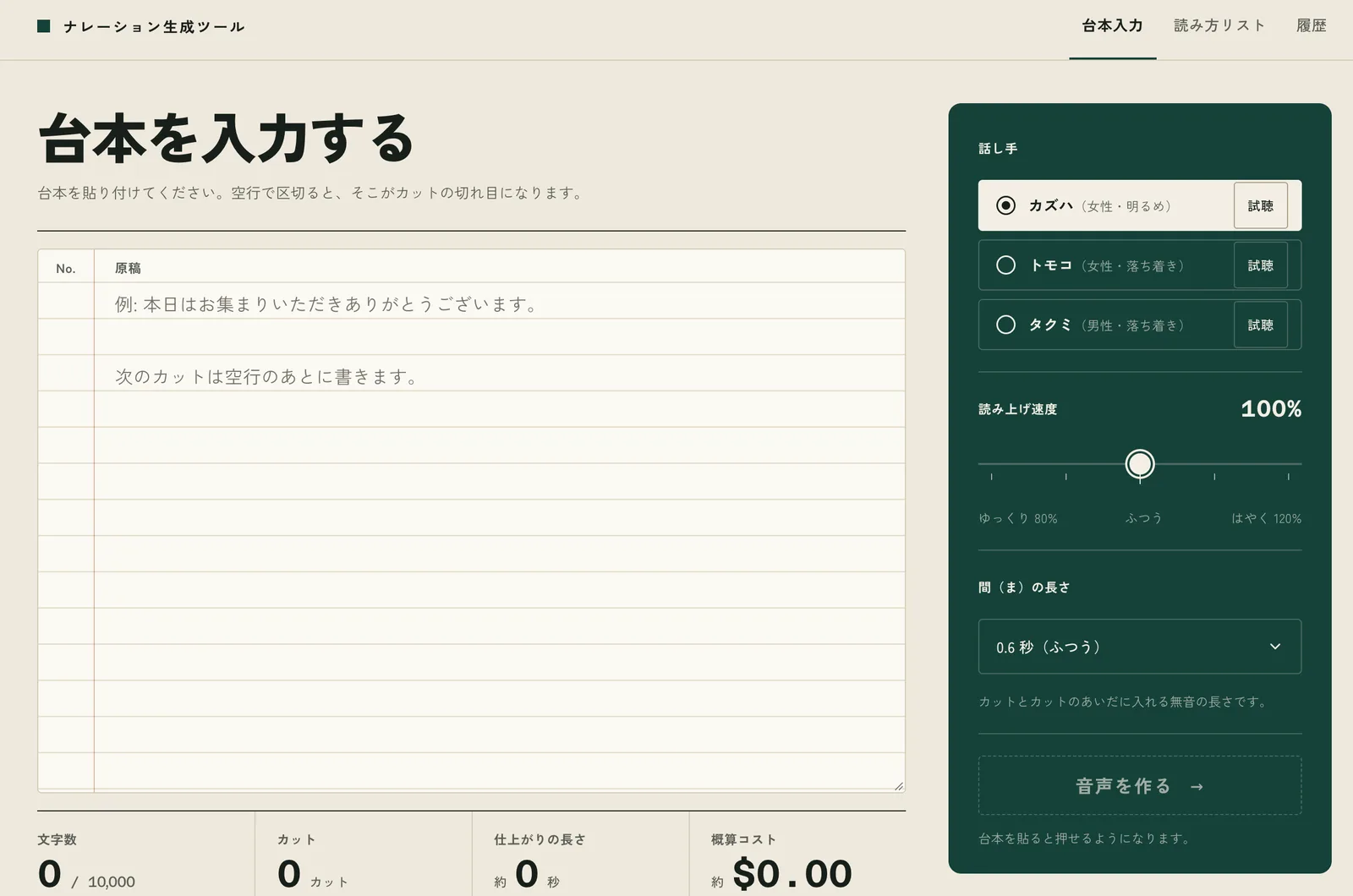
The users are one to three non-engineers at the client company. The tool has five screens. The basic flow is as follows:
- Paste a script. Separate cuts (the unit read in one go) with blank lines. Choose the speaker, reading speed, and the pause between cuts.
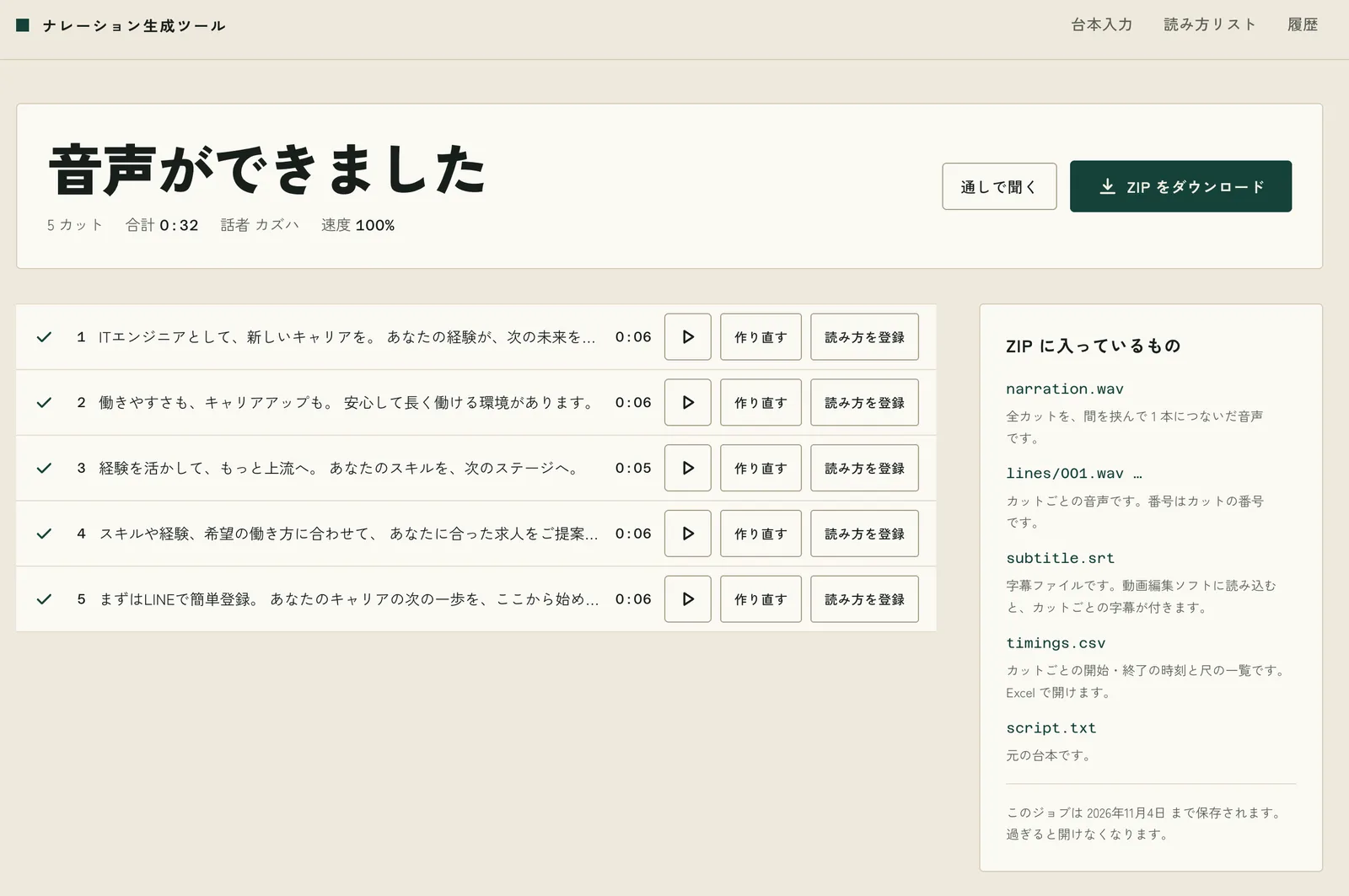
- Watch the audio being generated cut by cut.
- Listen to each cut and regenerate only the ones that don't sound right. When everything is fine, download the ZIP.
The ZIP contains:
- The full narration as one WAV file
- A WAV file for each cut
- A subtitle file (SRT)
- A CSV file with the start and end time of each cut
- A copy of the script
The other two screens are the "Reading list" and "History". If a word is read incorrectly, you can register its reading in the reading list, and the next audio generation will read it correctly.
The cost is $16 per million characters for Polly's Neural voices. Japanese narration is about 320 characters per minute, so a 10-minute video is about 3,200 characters, or roughly $0.05.
Cuts that have been generated once are saved, and they are not regenerated if the text is the same. Running the script again does not charge for cuts that haven't changed.
The architecture is as follows:
- App: TanStack Start running on Cloudflare Workers
- Storage for cut audio: Cloudflare R2
- Reading list and history: Cloudflare D1
- Authentication to restrict access to internal users: Cloudflare Access
- Speech synthesis: Amazon Polly. I don't use the AWS SDK. Instead, I call it with signed fetch requests (aws4fetch).
- Joining audio, converting it to WAV, and building the ZIP: done in the browser. The server doesn't process audio.
3. How I built it, part 1: firm up the design document first
From here on, I'll explain how I built this tool in one week.
I followed the same process I normally use. I used Claude Code and went through these steps in order:
- Firm up the design document
- Create the issues from the design document in one batch
- Refine the design for each issue
- Have each issue implemented one at a time
For steps 3 and 4, I used a Claude Code skill of my own that processes GitHub issues one at a time in a loop. It has a mode for designing the approach and a mode for implementing the issue and creating a PR.
I wrote two documents first:
ARCHITECTURE.md(the design document): purpose, screen specifications, data storage, API, constraints, and implementation stagesDESIGN.md(the UI specification): transcribed from mockups of four screens that I made on Claude's design canvas
I added the fifth screen, History, on the last day (more on this in section 5).
I narrowed the design to two principles:
- Users should not have to learn anything beyond pasting a script
- Corrections to misreadings should be handled by the system itself
Without the second principle, the same misreading would happen every time, and each time someone would ask a developer to fix it.
Based on the first principle, I also wrote the screen rules into the design document:
- No file upload. Only pasting is allowed. Text files can have different character encodings depending on the environment, which leads to garbled-text support requests.
- Do not show terms like "Polly", "SSML", or "synthesis" on the screen. Use "speaker", "cut", and "reading list" instead.
- The main operation is replacing a single cut, not regenerating everything.
- While generating, show each finished cut one line at a time. A progress bar alone looks like it has stopped, and people end up clicking the button repeatedly.
For the visual design, I went with "a paper script and a recording studio control panel". Lined manuscript paper sits on a natural-colored background, and the settings are on a deep green panel.
The design document also includes the implementation stages:
- End-to-end pass (paste a script, make audio for one cut, play it in the browser)
- Cut-by-cut loop
- Results screen
- ZIP
- Authentication
- Reading list
The reading list supports the second principle, but I deliberately left it for last. Launching first without it and seeing which words are actually misread makes it easier to understand the exact form it needs to take.
4. How I built it, part 2: create the issues from the design document in one batch
Right after the design document was finished, around 3:40 PM on September 30, I created 37 issues in one batch. All of #1 through #37 appeared within about one minute.
The issues follow the implementation stages in the design document, in this order:
- Project setup, CI, and design tokens
- The part that calls Polly
- Each screen
- ZIP
- Authentication
- Reading list
- Pre-release check on real devices
Each issue body contains only three things:
- A summary
- A reference to the design document (for example, "ARCHITECTURE.md 5.1, 11.1")
- Dependent issues
5. How I built it, part 3: refine each issue, then implement it in the loop
For each issue, I had the design mode of the skill write the approach as a comment before implementation. The format has three parts: "Problem", "Approach", and "Steps".
As an example, here is #13, which carried the end-to-end pass in stage 1. In this issue, I built the "Preview" button on the script input screen and confirmed three things along the way:
- Whether the signature works when calling Polly from Cloudflare Workers
- Whether the generated audio can be saved
- Whether audio loads and plays in browsers, including Safari
The approach comment states that I would not build a throwaway page just for checking. Instead, I would verify these things while building Preview, which is a real feature. The issue "Speaker preview" (#20) was originally separate, but I merged it into #13.
Where the design document didn't cover something, I made assumptions within the comment and moved forward. For #13, one assumption was limiting the preview text to 100 characters. The last step of the steps list is "Write what was learned into the design document". Each time an issue is completed, the design document catches up with the implementation.
Once an approach was settled, I had the implementation mode implement the issues one at a time and create a PR for each.
By the numbers:
- Issues: 42. All were closed by 12:09 PM on October 7.
- The first 37, plus #46 (described later), plus four more added on October 7: a cost display for administrators, history, a read-aloud check for readings, and display in yen.
- PRs: 49
- Commits: 217
- Code: about 42 files and roughly 6,100 lines for the application, and 38 files and roughly 7,900 lines for tests
There is more test code than application code. This is because the steps in the approach comment include writing tests. For #13, the second step was "Split the input validation and processing flow into functions and test them. Replace Polly and R2 with fakes."
6. Decisions I made along the way
Even while running the loop, there were points where I changed direction. All of these were my decisions.
Moved Cloudflare management from Terraform to the cf CLI
Originally, I managed both the AWS and Cloudflare resources with Terraform.
On October 4, I added #46 and moved the Cloudflare side to cf, Cloudflare's official CLI. cf went into open beta on September 28, 2026. Since its commands and configuration format may still change, I pinned the versions of cf (1.0.0-beta.12) and the beta 2.0 Vite plugin that reads its configuration.
While I was using Terraform, operations on Cloudflare were split across two systems. Creating R2 and D1 was handled by Terraform, while deployment and secret registration were handled by wrangler. Moving to cf means Terraform now handles only AWS.
Measured the script length limit on real hardware and set it
Joining audio and building the ZIP happen in the browser, not on the server. That means the maximum script length is determined by browser memory.
I measured this in Chrome on macOS under the worst-case conditions (80% speed, 1.0-second pauses between cuts):
| Characters | Cuts | Audio | ZIP | Peak JS heap |
|---|---|---|---|---|
| 5,000 | 34 | 17 min 52 s | 96.6 MB | 383 MB |
| 10,000 | 67 | 35 min 42 s | 193.1 MB | 516 MB |
The JS heap values are the larger of the readings before and after building the ZIP. I did not measure the peak during ZIP assembly. In both cases the tab did not crash, and there was plenty of room below the JS heap limit of 4,192 MB. On the morning of October 7, I first set the limit at 5,000 characters. Since the JS heap stayed at 516 MB even at 10,000 characters, I raised the limit to 10,000 characters.
Closing
I built a tool, in about a week from design to release, that lets non-engineers at the client company generate narration by pasting a script. From the user's point of view:
- Paste a script, choose a speaker and speed, and you get a full narration audio file and subtitles
- For a 10-minute video, the narration costs about $0.05
- If a word is misread, register it in the reading list and it will be read correctly from then on
The client is still in the process of adopting the tool. They have said that the screens are clear and easy to use.
I usually develop this way, turning a design document into issues. If you are a non-engineer who spends a lot of time on video narration, or you want a tool tailored to your own business, I hope this is useful.