Automating Tech Catch-Up with Claude Code Routines
- Published
- Tags
- Claude Code, AI, Automation, Cloudflare
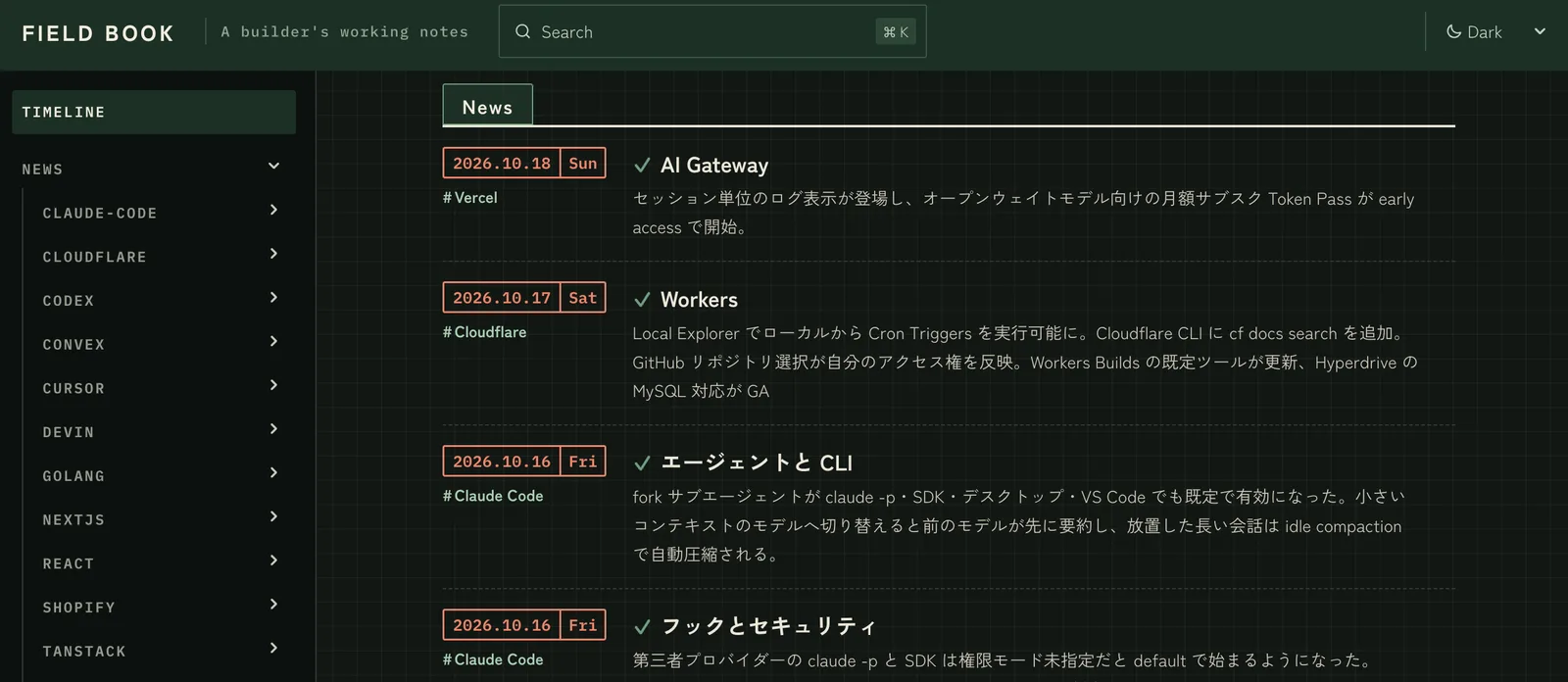
Introduction
The number of things I need to follow keeps growing, and I can no longer keep up with official updates. With AI, each technology and service is changing quickly, and I also need to keep up with AI itself.
Every morning around 5 a.m. JST, a Claude Code routine reads official primary sources and adds only the new entries to my own site. I check the new entries on my phone before work.
This article covers three things:
- The overall structure: skills, routines, and the site
catchup-news, which pulls only the diffs from official changelogs, andcatchup-topics, which builds a roadmap one item at a time- Two things I fixed in operation, and one I prevented before it happened
It is aimed at developers who follow more technologies than they can keep up with, and at anyone who has only got as far as running Claude Code skills and routines locally.
1. RSS did not turn into something I could read
Before building this, I followed updates by subscribing my site to RSS feeds in Slack and Feedly. However, it did not last, for two reasons:
- Each time I started following a new technology, I had to register another feed, which was a hassle
- The feeds delivered raw changelog and release note text, which was not readable without going through an LLM
I cannot read every update, so I needed to select what to pick up and what to skip. I decided that I would choose what to read, and leave collecting the updates and turning them into readable form to Claude Code.
2. Overall structure
There are three components:
- Skills: the procedures for what to read and how to write it. They are bundled in the repository's
.claude/skills/ - Routine: a claude.ai routine (remote execution) runs the skill every morning
- Site: the Markdown that gets added is served as a documentation site built with Astro + Starlight on Cloudflare Workers
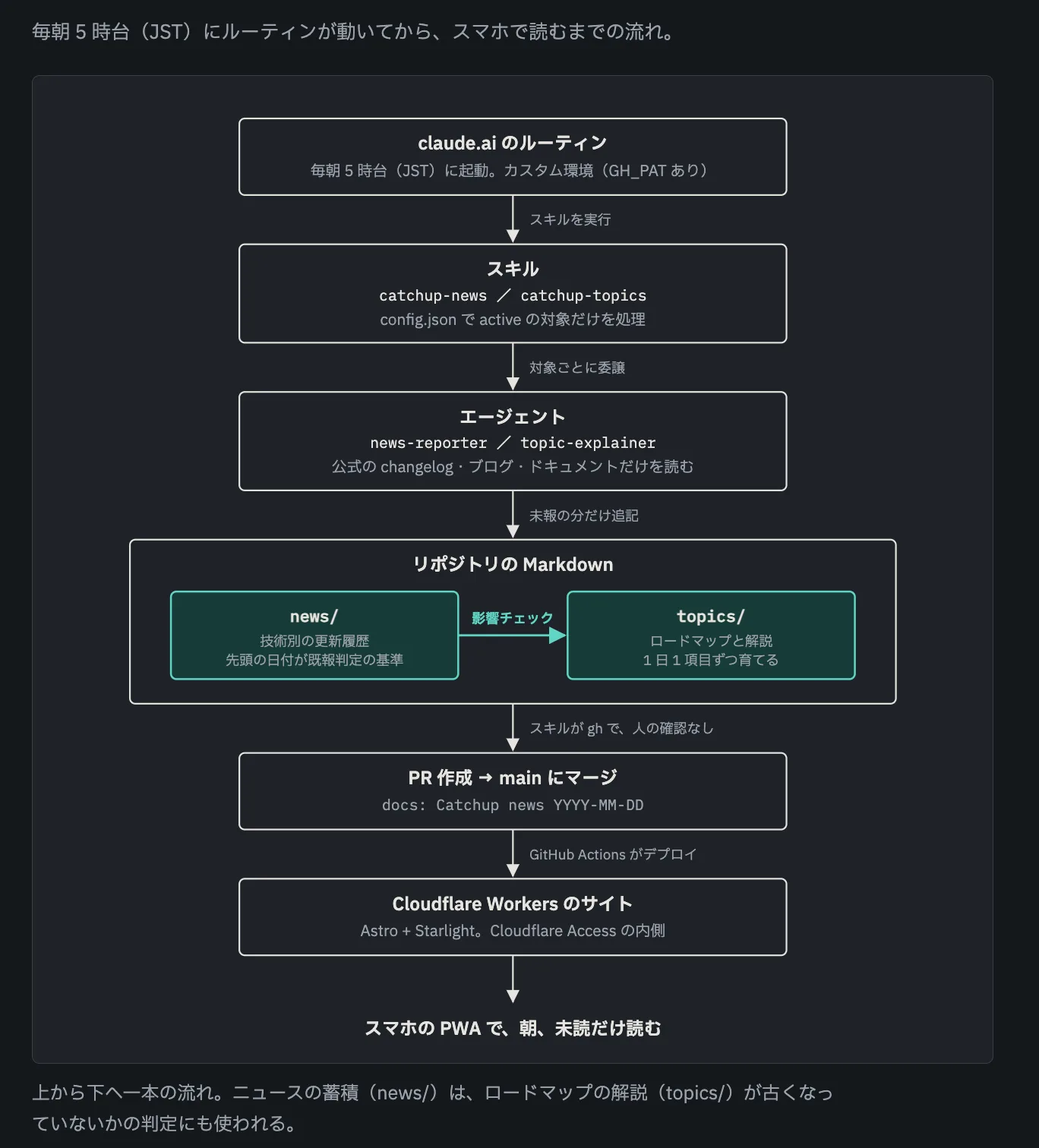
The routine starts from the repository and calls the skill. The responsibilities are split between the skill and the agents as follows:
- The skill (
.claude/skills/<name>/) only handles resolving targets, delegating to agents, confirming saved files, creating and merging PRs, and reporting - The agents (
.claude/agents/<name>.md) hold the research logic and the output format. There are two:news-reporterandtopic-explainer. Both read primary sources with WebFetch and write Markdown
No confirmation is requested from a person at any point.
When changes are merged into main, GitHub Actions builds the site and deploys it to Cloudflare Workers.
The site sits behind Cloudflare Access, so only I can view it.
I chose git-managed Markdown as the storage. The routine's output remains as PRs, so I can trace later what was added and when. The site's features and code live in the same repository, so if something is hard to read, I can fix it on the spot.
3. catchup-news: pulling only the diffs from official changelogs
This is the skill that is central to the morning run. What it does is simple: read the official announcement sources for each registered technology, and append only the updates that came after the last run to the notes.
Decide the targets in config.json
The technologies to follow are listed one entry at a time in a config.json in the same folder as the skill.
{
  "slug": "cloudflare",
  "name": "Cloudflare",
  "output_dir": "src/content/docs/news/cloudflare",
  "sources": [
    "https://developers.cloudflare.com/changelog/",
    "https://blog.cloudflare.com/",
    "https://github.com/emdash-cms/emdash/releases",
    "https://github.com/cloudflare/vinext/releases"
  ],
  "active": true
}
sourcesis a list of announcement URLs. It includes changelogs, official blogs, and GitHub Releases for specific projects. Only these sources and the official pages reachable from them are used.activeis a flag that decides whether an entry is processed. I set it by hand so the volume stays manageable, and the skill never rewrites it.
Right now, 14 technologies are set to active: Cloudflare, Convex, Next.js, TanStack, Claude Code, Cursor, Codex, Devin, TypeScript, Terraform, Go, React, Vercel, and Shopify. To add a technology, I just add one entry to this file.
Decide whether something has already been reported, using the notes themselves
Because it runs unattended every day, the most important quality criterion is that the same update never appears twice. I do not keep a state file. I use the existing notes as the reference instead.
The notes are one file per category (for Cloudflare, agents.md, r2.md, and so on), and they accumulate updates under date headings, newest first.
Before reading the announcement sources, the agent checks the date heading at the top of the note.
It only adopts updates newer than that date.
However, updates on the same date as the top heading cannot be judged by date alone, because different updates can be published on the same day. For updates on the boundary date, the agent compares the title and source URL of each entry under that date, and only adopts the ones that do not match as not yet reported.
If there are no unreported updates, the agent does not change any files and reports "no new items." It creates neither a note nor a PR.
Fix the body to a format that can be skimmed
The reader is me. I do not want to read release notes end to end, so I standardized the format so I can judge in a moment whether an update matters to me.
## 2026-10-13

### Agents SDK adds the browserTool persistent browser tool

Agents can now return to the same browser they used in the previous turn and continue their work.
This is useful when you want an agent to operate while keeping a login state. It works with Agents SDK 0.28.0 and later.

- Tabs, cookies, and login sessions persist across turns. They are kept even while the Durable Object is hibernating, and the default idle timeout is 10 minutes
- Screenshots are returned as images, so a model that supports images can check the content

A Durable Object is a small serverless execution unit that can hold state.

Source: [New persistent browser tool in the Agents SDK](https://developers.cloudflare.com/changelog/post/2026-10-13-persistent-browser/) (published 2026-10-13)
- In the first one or two sentences, state whether the change affects existing code, or whether it is enough to just know about it
- List the changes as bullets in order of importance, with only one change per item
- Add a short explanation for technical terms. Rather than putting a long explanation in parentheses, write it as a separate sentence right after
- Every entry includes a source URL and a publication date. Updates without a source are not written
The date on an entry is the official announcement date, not the date the routine ran.
The updated value in the frontmatter is also set to the announcement date of the latest entry.
The next day's duplicate check uses this value as its reference.
4. catchup-topics: building a roadmap one item per day
News tells you "what changed." Some technologies have no foundation that would let you understand that news in the first place. So I created a separate skill that adds one explanation page per day, following a learning roadmap for each technology.
The roadmap is a numbered list in the index
The index for each technology's folder holds a numbered list of items. Completed items are marked done, and the index links each one to its explanation page. Items without an explanation yet stay as plain text.
### 1. Fundamentals

- 1-1. Get the big picture: what is vinext (done)
- 1-2. Create a new project and get it running (done)
- 1-3. Migrate an existing Next.js app (check and init)
- 1-4. Understand the differences from Next.js and the unsupported scope
The roadmap is not a table of contents for beginners. I build it so that completing it brings you to a level where you can design and operate in real work. The coverage standard is the official documentation as a whole, and there is no upper limit on the number of items. Each item is sized so that it can be explained in a single write-up.
In each morning run, the agent handles the first unstarted item.
It reads only the pages it needs from the official documentation for that target, creates one explanation page, and changes the item in the index to done.
When a target has no unstarted items left, "done": true is added to its entry in config.json, and it is no longer read from.
Targets can be nested as parent and child. Under Cloudflare, there are Cloudflare OS, EmDash, vinext, and the cf CLI. The parent covers the overall picture, and the children go deep into each product, so the roles are separated. All nodes can be launched in parallel because each node only touches its own index and its own folder.
Mark explanations as needing review when news makes them outdated
Once an explanation is written, news published later can make it outdated.
So I link the news files related to a target in the config as news. Then an impact check runs at the start of processing.
{
  "name": "vinext",
  "path": "src/content/docs/topics/cloudflare/vinext/index.md",
  "news": ["news/cloudflare/vinext"],
  "docs": ["https://vinext.dev/", "https://github.com/cloudflare/vinext"],
  "active": true
}
The flow is as follows:
- Read the linked news files and understand the entries for each date
- For each completed item, consider only the entries dated later than the
updatedvalue of its explanation page - Judge whether each such entry changes or makes obsolete the content of the item. A new version, a change or removal of an API or setting, or a change to a default value counts as an impact. An unrelated feature addition or a purely cosmetic change does not
- Change the index line only for items that are affected, marking them "(needs review)"
- In the same run, update the explanation pages of items marked "needs review" to the current version
When a target still has items that need review, it is not treated as finished even if all its items were completed. Its done flag is cleared, and it goes back into processing.
On the site side, a page becomes unread again if its updated date is newer than the date I marked it as read.
A corrected explanation shows up as unread the following morning.
5. Two things fixed in operation, and one prevented in advance
I will describe two things I actually fixed, and one that I prevented at the design stage.
The PR could not be created in the routine's Default environment
When the routine's cloud environment was set to "Default," gh pr create did not work.
The Default environment has no GitHub credentials, so the notes were pushed to a claude/<random name> branch and then stopped there.
Since they never reached main, they never appeared on the site.
The fix was to switch the environment name next to the repository selection in the routine's edit screen to a custom environment that holds GH_PAT.
No changes to the skill or prompts were needed.
For the branches left behind, I found them with git branch -r | grep claude/, created PRs manually, and merged them.
How to create the custom environment and pass the PAT is described in my article on running a private plugin in a cloud routine.
The date was off by one day because of UTC
The routine runs early in the morning in Japan time.
At that hour, UTC is still the previous day.
When I got the date without specifying a timezone, the commit message, the PR title, and the updated value in the notes were all off by one day.
The fix was to make every place in the skill that derives a date use TZ=Asia/Tokyo date +%F.
I also unified the date passed from the skill to the agent to this value.
I corrected the notes whose dates had been written incorrectly, by hand.
Duplicate entries were prevented before they happened
This was not something I fixed after it went wrong. I built it in when I designed the duplicate check. If duplicates are judged by date alone, you either miss a different update published the same day, or you post the same update again the next day. The procedure that matches boundary-date updates by title and source URL is there to avoid both. The routine has been running for more than a week now, and no duplicates have appeared.
6. What changed
The biggest change is that I now spend much less time gathering information from social media.
I made the site a PWA and placed it on my phone's home screen. It is easy and pleasant to check.
As of 2026-10-19, the knowledge base contains 45 news files and 86 topic files including indexes. The topics with explanations in progress are four Cloudflare products, Convex, Next.js, TanStack and three of its products, and Grok Bot. For Go, TypeScript, and others, news keeps being tracked, but I have set their topics to inactive and am holding them for now.
7. If you want to build this in your own environment
The minimum setup is one skill, one agent, a config.json, and one routine.
The order to build it is as follows:
- Place the procedure and
config.jsonin.claude/skills/<name>/in the repository. The procedure needs to cover five things: resolving targets, launching the agent, confirming saved files, creating and merging PRs, and reporting - Place the research role in
.claude/agents/<name>.md. It needs to cover: understanding what has already been reported, reading the announcement sources, a judgment that narrows things down to only unreported items, and the output format. Limit the sources to the URLs in the config and the official pages reachable from them - In a claude.ai routine, specify the repository and a custom environment that has
GH_PAT, and call the skill every morning - The site can come later. Once the Markdown has accumulated in the repository, you can change how it is displayed at any time
There are two things to decide up front:
- Narrow the technologies you follow with
active. You can register as many as you like, but only run the volume you can actually read. - Use git-managed Markdown as the storage. The notes also serve as the basis for the duplicate check, so you do not need a separate state file.
Closing
What I wanted was a system that selects the information I pick up, and delivers it every morning in a form I can read right away. Deciding what to follow is up to me, and collecting the updates and turning them into readable form is handled by Claude Code skills and routines.