Making Claude Code Skills Visible to Your Team: Why I Built a Catalog Site
- Published
- Tags
- Claude Code, AI, Next.js, Developer Experience
Introduction
I manage my Claude Code skills and subagents in a single repository. Two people use it, and it currently contains 40 skills and 3 agents.
Even at this size, keeping track of what exists was not easy. So I built an internal catalog site that generates a list automatically from each file's frontmatter.
This article covers three things:
- How I got here
- What changed after I built it
- What kinds of skills and agents it lists
I keep the implementation details to the essentials.
It is written for people who have started using Claude Code skills or agents with others and are beginning to feel that they need to get organized.
1. More things I could only learn by opening the definition files
Running /help or listing skills in Claude Code shows you their names.
But names were not enough.
Subagents declare the tools and model they can use.
Does it allow Bash, or is it read-only? Is it sonnet or opus?
That information directly affects safety and cost, but I had been opening each definition file one by one to check.
I also ran into the problem of similar skills piling up.
For a while, there was a separate skill for creating issues, issue-new, alongside issue for listing and analysis.
Keeping the two apart was a hassle, so I merged them into issue.
When names are similar, you cannot tell them apart without reading the description, and the description lives inside the definition file.
2. A catalog generated from frontmatter
What I built is a website where you can browse the skills and agents.
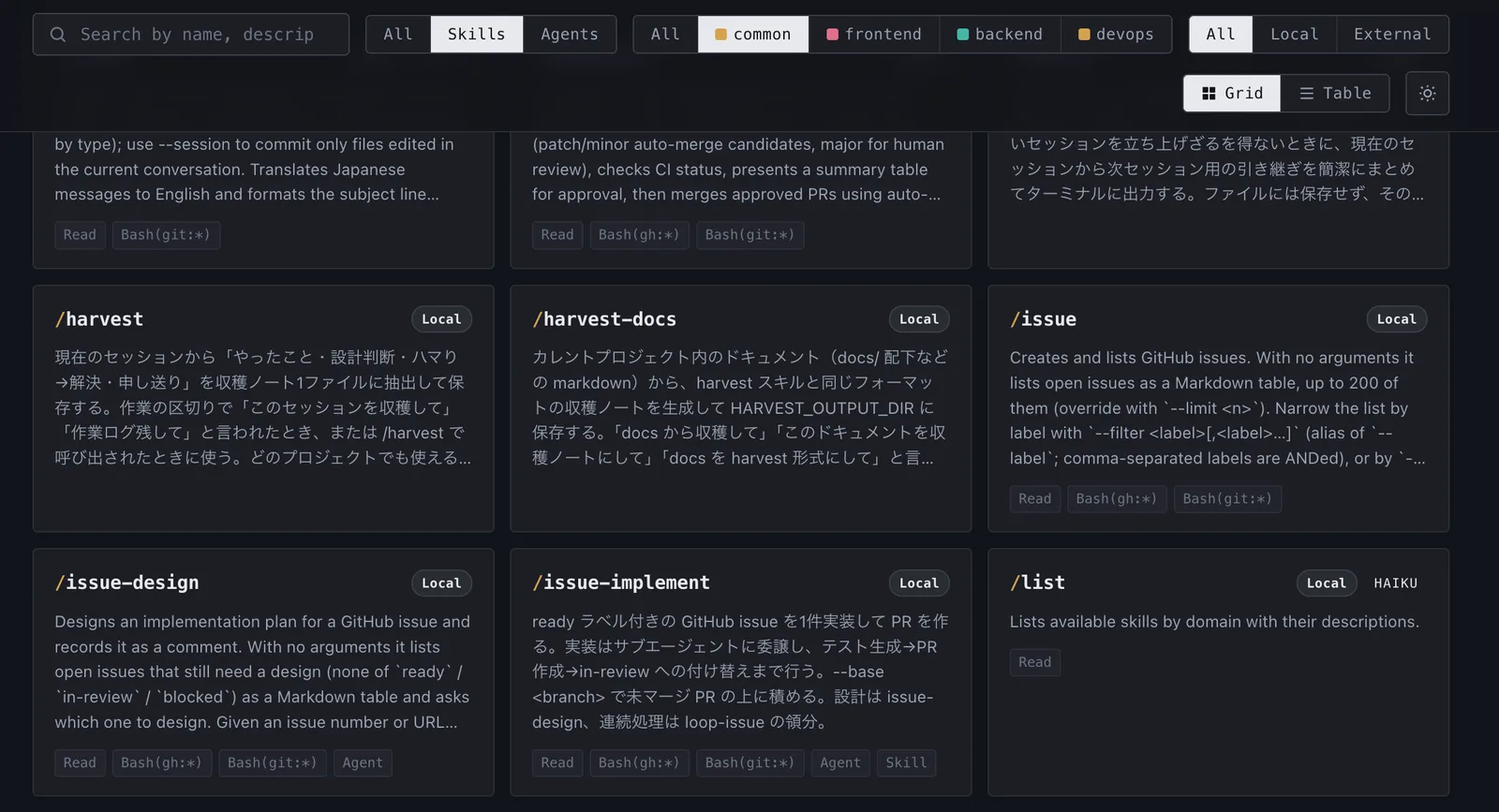
I do not write any separate data for the catalog.
Claude Code skills (SKILL.md) and agents (agents/*.md) each start with YAML frontmatter.
name and description are required. Agents also declare tools and model, and skills can declare argument-hint.
---
name: test-writer
description: Generates test code for target code (a branch diff or specified files).
  It detects the project's test runner and existing conventions automatically,
  then runs the tests to confirm they pass. ...
tools: Bash, Read, Write, Edit, Glob, Grep
model: sonnet
metadata:
  origin: local
---
The catalog reads this frontmatter as it is.
The descriptions I write for Claude Code to read double as the list that people read.
When I add or update a skill and merge it into main, the catalog updates too.
The site supports the following:
| Feature | Details |
|---|---|
| List by domain | Displayed per plugin: _common, frontend, backend, devops |
| Search and filter | Search by name and description. Filter by type (Skill / Agent / Hook / MCP) and domain |
| Detail modal | Shows the full text of SKILL.md and INSTRUCTIONS.md, with one-click copy |
| Metadata | An agent's tools and model, a skill's argument hint, and the agents it delegates to |
| Origin | Tells apart skills I wrote (origin: local) from ones imported from outside |
The origin filter was not there at first. I added it a few days after publishing. Some skills are public and maintained outside my repository. I list them alongside my own skills, but they need separate handling. I needed to distinguish "this is something we can fix ourselves" from "this is something we track upstream."
3. What changed
| Situation | Now |
|---|---|
| Checking how many skills exist | I used to need ls. Opening the site shows the count and the full list |
| Explaining things to a new member | I only need to share the marketplace install steps and the catalog URL. The explanations are the description fields the skill authors wrote |
| Before creating a new skill | I search the catalog first and extend an existing skill if something similar exists |
| Agent permissions | tools and model appear in the list, so I can check them without opening the definition file. This helps during reviews |
| Taking definitions to another project | The detail modal lets me copy the full definition file |
4. How it works (the key points)
The implementation is small: a single static site built with Next.js.
my-ai-plugins/
├── domains/
│   ├── _common/
│   │   ├── skills/<name>/SKILL.md      ← read here
│   │   └── agents/<name>.md            ← read here
│   ├── frontend/
│   ├── backend/
│   └── devops/
└── dashboard/                          ← the catalog itself (Next.js)
    ├── lib/catalog.ts                  ← scans frontmatter and builds the list
    ├── app/page.tsx
    └── wrangler.jsonc                  ← Cloudflare Workers configuration
lib/catalog.ts looks for domains/*/skills/*/SKILL.md and domains/*/agents/*.md, then uses gray-matter to extract the frontmatter.
If a file has broken YAML, the build does not fail. It prints a warning and skips that file.
I did this so that one mistake in one skill cannot wipe out the whole catalog.
All of the data is embedded at build time, so the runtime does not need a file system.
GitHub Actions detects changes under dashboard/** or domains/** and runs the build and deploy.
Once a PR that adds a skill is merged, it appears in the catalog a few minutes later.
5. What is actually in it
My skills fall into two broad groups: automating the development flow, and calling on specialist knowledge.
Skills that run the development flow
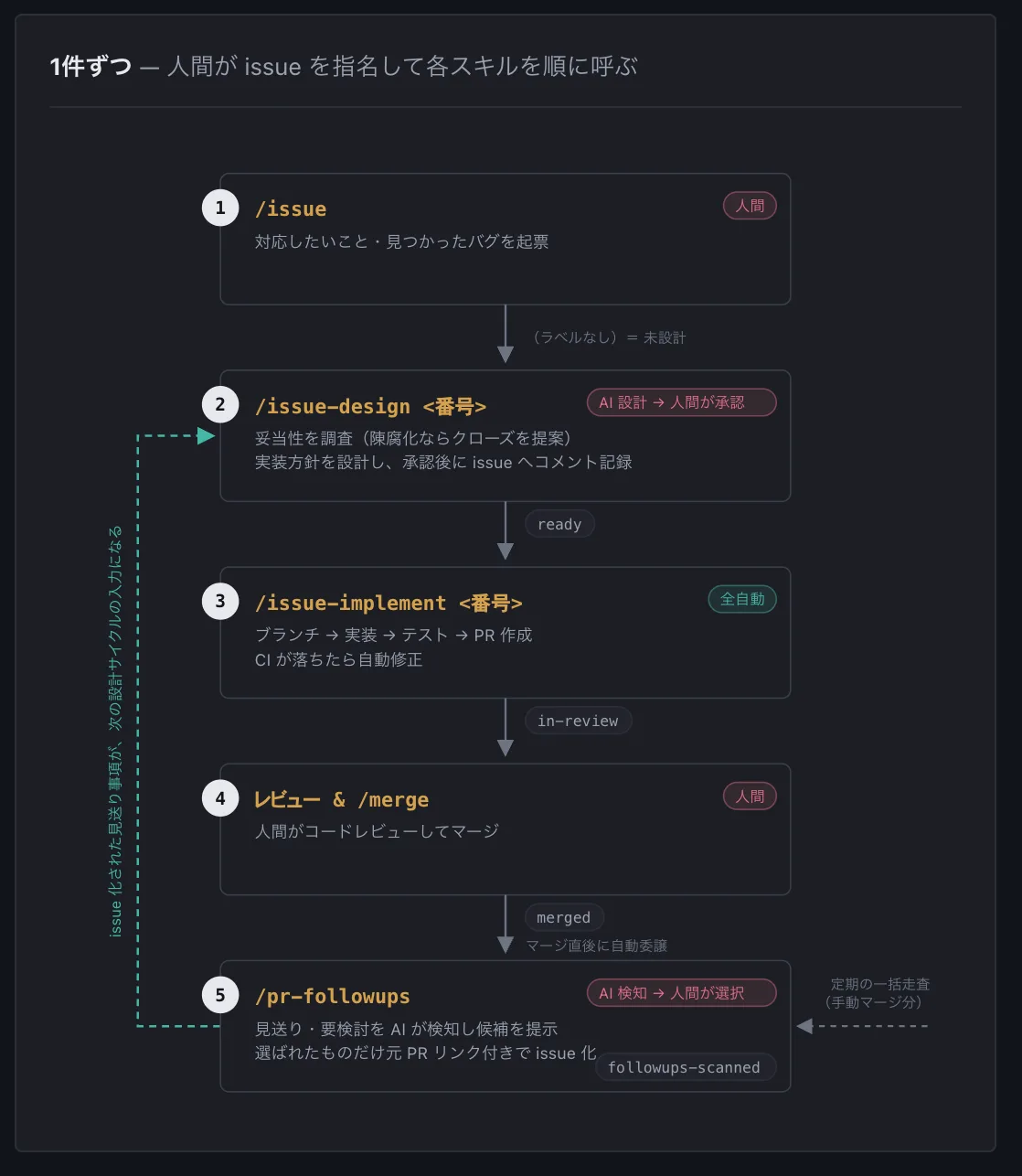
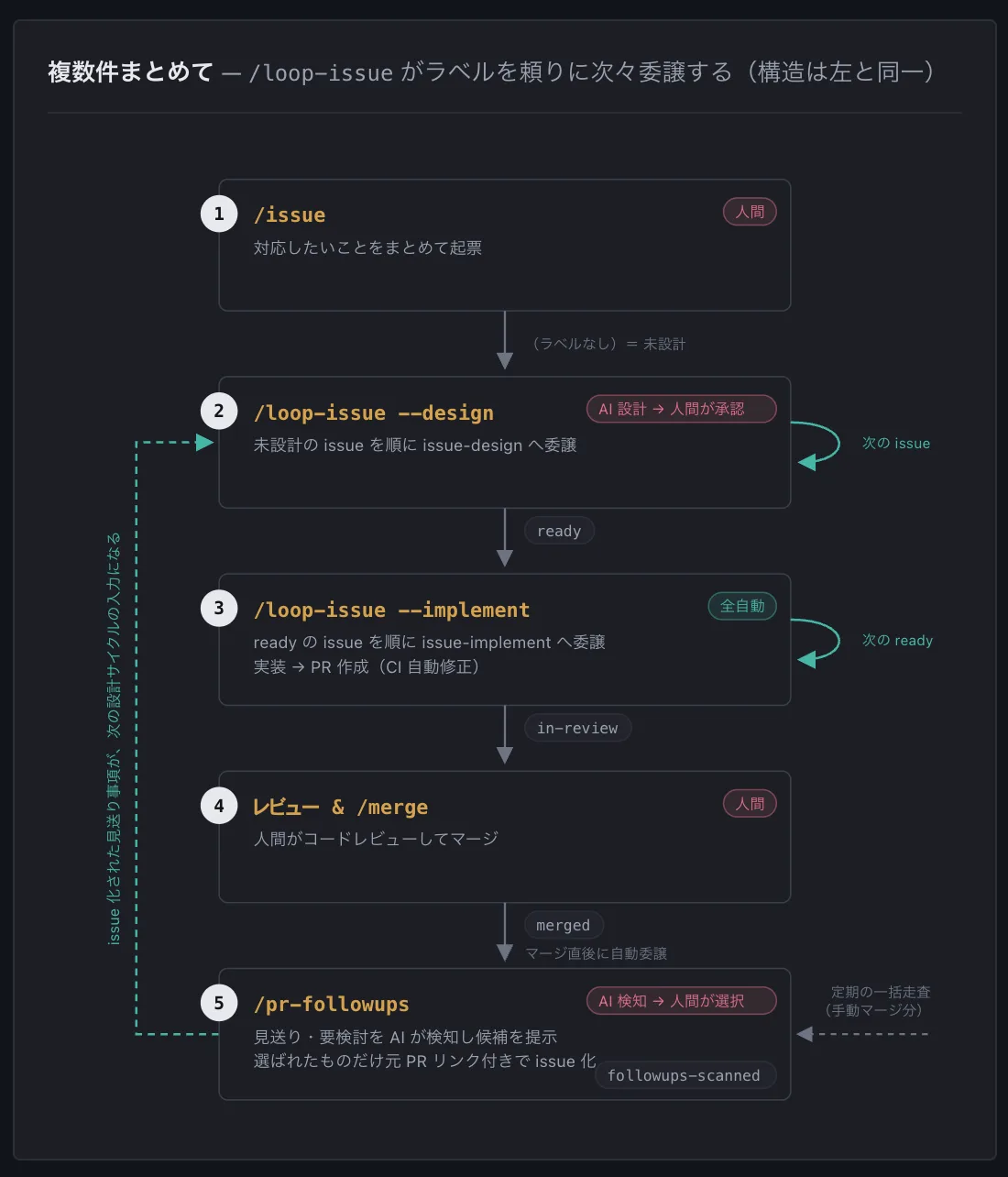
I use Claude Code skills to chain everything from opening an issue to merging a PR into a single flow.
| Stage | Skill | What it does |
|---|---|---|
| Open | issue |
Creates an issue right away from a title alone |
| Design | issue-design |
Checks whether the issue is still valid, proposes an implementation plan. Once approved, the plan is recorded as a comment and the ready label is added |
| Implement | issue-implement |
Has a subagent implement a ready issue, carrying it through test generation to PR creation |
| Batch | loop-issue |
Designs and implements several issues in order. Dependent issues are stacked as stacked PRs |
| Follow-up | pr-followups |
Scans merged PRs and picks up deferred items as candidates for new issues |
Humans only make a few decisions: approving designs, merging PRs, and confirming whether tests should be generated. I also added a page to the catalog that explains this flow.
Skills that bring in specialist knowledge
The frontend domain has React and Next.js best-practice guides published by Vercel, along with UI/UX design knowledge.
It also includes a skill that takes landing-page work through four stages: strategy, copy, design spec, and layout.
In devops, there is a skill that interactively sets up a Cloudflare Workers deployment (GitHub Actions + dotenvx).
In backend, there is a Supabase / Postgres optimization guide.
I bring in publicly available skills as they are, and use origin to tell them apart from my own.
Skills that support daily work, and skills that create skills
harvest saves what I learned in a session to a notes file.
handoff carries work over from a broken session to a new one.
allow-perms adds commands that keep triggering permission prompts to the settings.
None of them are flashy, but these are the ones that reduce everyday friction.
6. If you want to build this in your own environment
My setup needed three things:
Collect skills and agents in a single repository
If you format the repository as a Claude Code plugin marketplace, everyone on the team can install the same set with
/plugin marketplace add.Write the frontmatter properly
If
descriptionis empty, the catalog shows an empty entry.Create one page that reads the frontmatter and renders a list
A static site is enough for my setup. It uses no database and no API.
The third item does not have to use Next.js. Astro would work, and so would a script that just turns Markdown into HTML.
Closing
The catalog itself is internal and not public, but what it takes to build one is the three items in section 6, and none of them is special. If you already write frontmatter so Claude Code can read it, you already have the material for the list.